

Over the past few weeks, it has been impossible to miss the excitement and hyperbole over Claude Code, Anthropic’s AI coding tool over the past month or so. But is this hype pointing to a genuine inflexion point? What better way than spending some time hands on with it and try to make sense of what it tells us about the future of AI and work. Certainly, I’d hope to understand what it says about the state of AI coding today. Now, some caveats: I am at best an occasional hobbyist coder. I am not a software engineer. This is certainly not an assessment of how Claude Code can be used in production or enterprise-scale systems.
This will be a two-part blog. This post will run through my experiences with Claude Code, getting a sense of what it can do today. In Part 2, I will consider Claude Code says about the state of AI more broadly and what it means for the work of the future. Let’s go!
What others are saying
The excitement about Claude Code feels somewhat breathless. Andrej Karpathy, part of OpenAI’s founding team and previously director of AI at Tesla, said, “Given the latest lift in LLM coding capability, like many others I rapidly went from about 80% manual+autocomplete coding and 20% agents in November to 80% agent coding and 20% edits+touchups in December.” Jaana Dogan, a principal engineer at Google, claimed that her team built a distributed agent orchestrator in one hour, a problem they had been working on for a year. Similarly, Boris Cherny, the head of Claude Code at Anthropic, said, “Pretty much 100% of our code is written by Claude Code + Opus 4.5. For me personally it has been 100% for two+ months now, I don’t even make small edits by hand. I shipped 22 PRs yesterday and 27 the day before, each one 100% written by Claude.”
So clearly something is afoot. Whilst these claims cannot be independently verified, the excitement feels real, somewhat reminiscent of what happened when ChatGPT was launched in 2022.

The project - introducing Weavify
So how difficult would it be to build something genuinely useful? I settled on an AI bookmarks and research assistant app. Until a year or so ago, I used to use Mozilla’s Pocket bookmarks app to tag web content that was interesting to read later. Mozilla then discontinued this product last summer, and I had not been able to find a suitable alternative. How about if instead I ‘vibe code’ my own app?
I started by having a think of what I’d want. Yes, I’d want bookmarking capabilities and the usual features to organise content according to projects (e.g. blogs I was thinking of writing), tagging, etc. But why not add AI-enabled features? So I started to scope an app that would allow me to add bookmarks (using a Chrome extension initially). It would auto-categorise, suggest tags, and create Twitter-like summaries. Once collated, it would also create summaries of my collated bookmarks, extract key themes, suggest topics and articles for further reading, and organise the bookmarks as neat citations. Yes, I know that Google’s NotebookLM already does much of this.
First Impressions
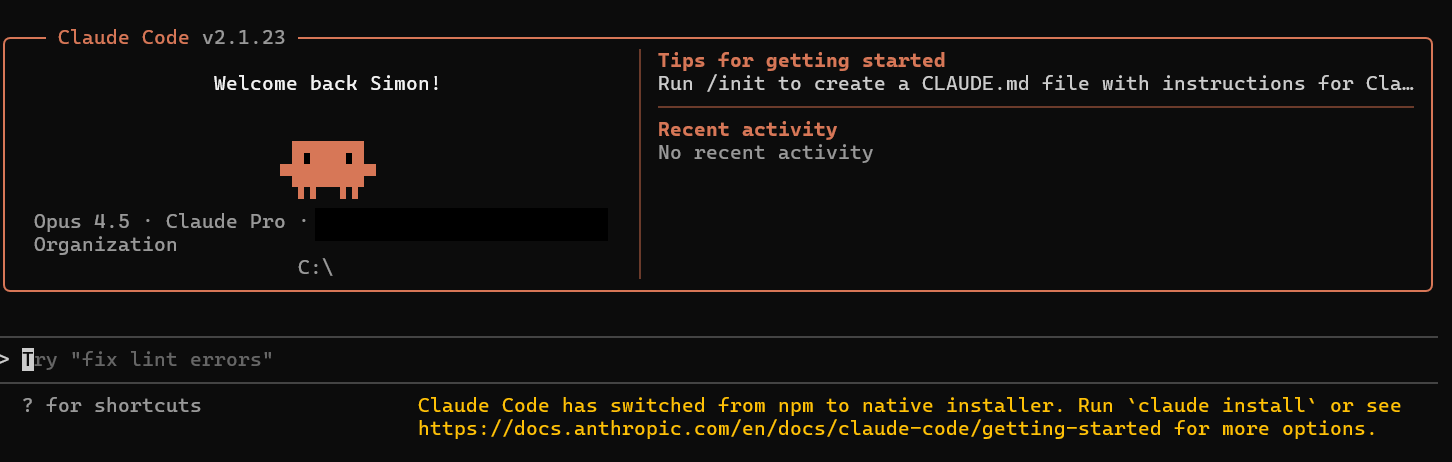
Well, Claude Code is initially a bit intimidating. Its text-based CLI is somewhat reminiscent of the 80’s TV Teletext service. At times, however, first impressions can be deceptive. As it is a CLI, accessible through your computer’s terminal, it effectively operates on your behalf, accessing and changing files, installing software and so on. It very much looks like a programmer’s tool, because it is indeed a programmer’s tool.
Anyway, what did I learn from working through this?
1. AI chatbots - your trusted advisors
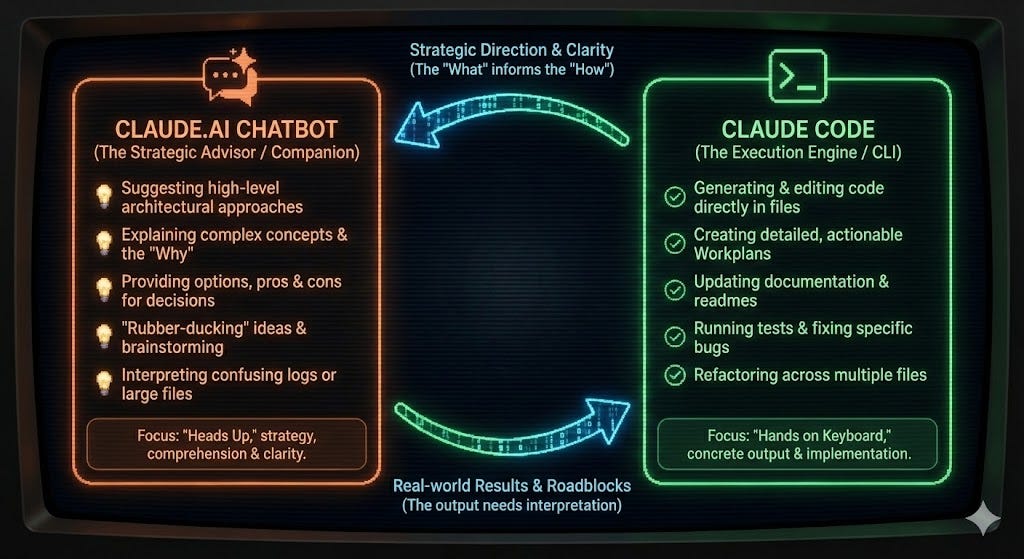
Claude Code is optimised for “doing” stuff. All the coding, building, testing and so is carried out by Claude Code. So, given that I wasn’t quite sure where to start, Anthropic’s AI chatbot, Claude.ai can provide a great starting point. It will help you through coding and deployment options, explain how to use Claude Code etc. By having these speculative conversations about pros and cons in a separate ‘sandboxed’ chatbot, I felt confident that I was not driving Claude Code down unintentional rabbit holes.
2. Documentation over Code
The Agile Manifesto, the seminal set of principles of modern software development, famously recommends prioritising the creation of code over documentation. I’d suggest that when working with AI coding agents, the reverse is true, at least for the human supervisor. Let me explain. First, the success or failure of AI coding is driven by the quality of its inputs. Bad inputs give bad outputs, with all code generated being predicated on the quality of its inputs. I learned that it is essential to get these right. In my case, I used a Product Requirements Document and an Architecture Specification. This helped ensure that Claude Code and I were on the same page. It uses the code produced and the associated documentation as their input context. The documents effectively act as a signal of intent, and the principal way I could steer the direction of travel of my app.
3. Slop is a Human Artefact, not an AI Artefact
Much has been said, with reason, about how AI slop is taking over the world. Whether it is all those inane videos on TikTok, AI-generated self-promotion on LinkedIn, AI-generated E-books and so on. However, in coding, it is the human who is responsible for slop. Here’s why. Give Claude Code, or indeed any generative AI tool a vague, generic question, then you will get a generic output. Generative AI algorithms are designed to create outputs most likely to elicit positive feedback from humans, so they tend to create statistically “average” outcomes. They can be fluent, polished, and coherent. But they are rarely distinctive.
The same is true for AI coding. Give it a vague input, and the tool will create a middle-of-the-road, “best fit” answer. It will have no implicit understanding of the nuance of your needs nor of your customers’ drivers, and so it will create something that works, but that is also pretty generic. In other words, slop. The more specific you are, the more context you can provide Claude Code, the better it can help you, and the more distinctive and useful the output can become.
4. Planning Mode - who is the intelligent being in this relationship?
Claude Code offers three modes of operation: Ask, Plan and Code. In Planning mode, you are guided through the process of creating the input artefacts, primarily the requirements document. This is where it becomes really interesting, as you can ask Claude Code to ask you clarification questions. Claude will refine its understanding of your intent by asking you several questions, asking for your preferences, or instead to suggest alternatives. It is designed to specifically surface trade-offs. Some may be architectural - e.g. what is the authentication strategy for the app, some may be usability related -e.g. do you want a ‘one-click’ bookmark feature for the app.
This is where your fundamental user insights come in. Here you are firmly in the role of product manager, working with a product development team, guiding them through the implications of what you are asking for, whilst asking probing clarification questions. Sometimes I did not understand the implications of the tradeoffs being proposed, but a quick chat with Claude.ai quickly solved that problem.
What ensues is a very involved back-and-forth with Claude Code, where you are iteratively refining and clarifying intent. Again, this is the heart of what’s been described as “coding in English.” I must say that I found this experience pretty spooky. It is somewhat of a role reversal compared to using a normal AI chatbot, where the user is the one asking the questions and guiding the conversation. Now, the AI is the interviewer. It patiently figures out the detail of what you have failed to articulate clearly, as well as surface implications or considerations that you have not yet thought about. This was probably the most impressive aspect of the Claude Code experience, but also somewhat chastening, providing a glimpse of what interacting with truly agentic systems might feel like.
5. Plan and Iterate - Your “house rules”
As I mentioned, while getting a great plan in place is essential for success, all the principles on how to approach creating a viable piece of software remains valid. For example, Claude.AI suggested how best to chunk up the development, starting with the architectural fundamentals - getting the Google Authentication system working, creating the databases for storing the content, establishing the secure storage for secrets, and so on. This allows you and Claude Code to take controlled, incremental steps towards your intended outcome. Yes, many people indeed claim that you can create an app in a single shot, and I have no reason to doubt it. It can, however, be an expensive and time-consuming exercise to undo, refactor etc. Better, in my mind, to take it step-by-step, and build from the ground up.
And this brings us to a key point. With Claude Code, you are in control of the development approach. Detailed planning up-front or step-by-step iteration and experimentation? It is up to you. Effectively, if you wish, you are in control of how you carry out the development. The tool for doing this is claude.md, which are effectively the “house rules + how we work”. This lets you shape what effectively is your personal or organisation-wide methodology, covering how you will document your work, the approach to testing the code, how to commit code to your git repository, your approach to security etc.
6. Fast creation, slow fine-tuning. Don’t talk about cost!
My experience creating this one-off app has been that getting the functionality off the ground was really quick. Once you have clear requirements, Claude Code can make really quick progress in generating a pretty decent first stab of your product iterations. It feels like you are flying, and quite mesmerising, seeing Claude deploy multiple agents in exploring and shaping different parts of the plan, as well as seeing it go through the process of creating code, building, testing, debugging, fixing, etc. In practice, there are different subagents working on different tasks, but there is nothing stopping you from creating different agents manually.
And so all is bliss, until you get to the point where the product is nearly right, but not quite perfect. So you start fine-tuning, implementing small corrections, going back-and-forward, and then you see your token count rise. And this is where time and cost, gets burned. Not only in fine-tuning your product, but in working through the edge-case defects that stop it from being truly production-ready. Granted, this was only my first attempt, but I got to 80% to where I wanted to be in 2 or 3 evening sessions, and then spent more than that amount of time doing final debugging. My $20/month Claude Pro plan was not quite sufficient to meet my desire for progress, particularly when, in the depths of debugging, I found myself occasionally topping up, rather than waiting for my next quota of usage.
In conclusion
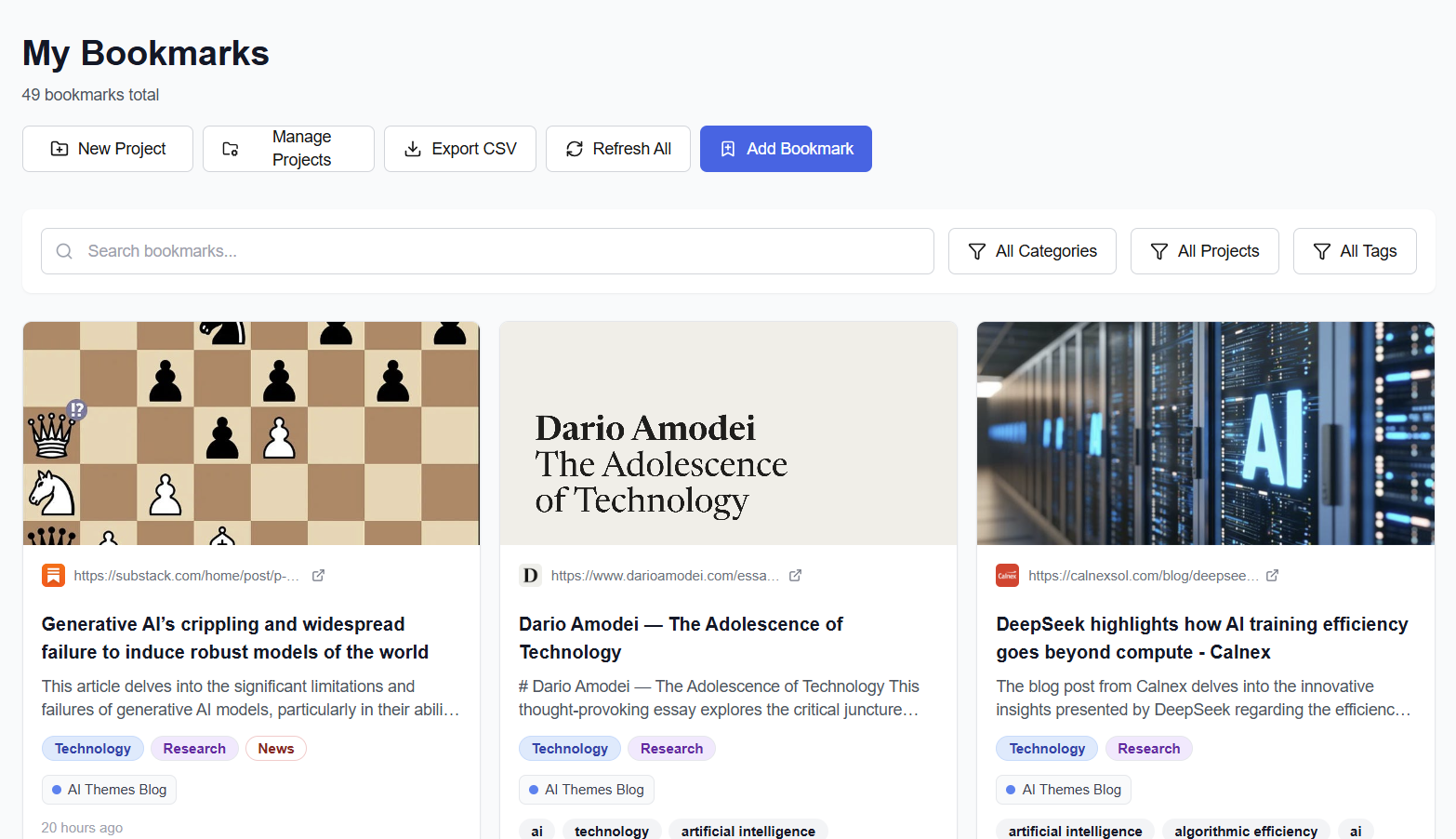
Here’s the web version of Weavify. It also renders quite nicely in a mobile view, though that is something I only thought of later, and so had to refactor the UI. The app works really well, and is now genuinely useful. I will reflect on what I think this means more broadly in Part 2 of this post, but for now, I feel equally excited and anxious. The experience has felt like working with a team of really-enthused expert engineers. Engineers with the tenacity to keep going and persist through errors, patiently seeking alternative approaches, and with the empathy to ask sensible questions, curious, but never sneering.
It therefore feels really invigorating. For all the talk of AI leading to cognitive laziness, I feel I have learned a lot more about the practicalities of building real-world apps in a couple of days than I have in a long time. It is empowering. Anyone, be they engineers, product managers, founders, or senior execs, can now experiment with ideas in a fraction of the time it would otherwise have taken. This is doubly true for anyone who hasn’t got the hands-on skills to create useful code themselves - much like yours truly. Yet, at the same time, I feel a slight sense of unease. Claude Code is giving glimpses of what the future of work may be, and it’s not something I believe we are prepared for. For more of that, wait for Part 2.
Further Reading
Mollick, E., Claude Code and What Comes Next, One Useful Thing, January 2025
Beck, K. et al., Manifesto for Agile Software Development, Agile Manifesto, February 2001
Yip, C., Claude Code: Ask User Question Tool Guide, AtCyrus, 2024
Anthropic, Claude Code Best Practices, Claude Code Documentation, 2024
AI-Generated Annexe: The Technology Stack behind Weavify.
Author: Claude.ai Opus 4.5
Note, this section is completely AI-generated from the Weavify project documents. It describes the technology stack and the build workflow used to create the app.
Summary 1: The Technology Stack Behind Weavify
Weavify is a full-stack web application that combines modern frontend frameworks with AI capabilities to transform how users organise and understand their saved web content. Here’s a look at the technologies that power it.
The Foundation: Next.js 14 and TypeScript
At its core, Weavify is built on Next.js 14 using the App Router paradigm. This choice enables server-side rendering for optimal performance while maintaining the flexibility of React 18 components. TypeScript provides end-to-end type safety, catching errors at compile time rather than runtime. The styling layer uses Tailwind CSS for rapid, utility-first development.
Data Layer: PostgreSQL with Prisma
The application uses PostgreSQL as its database, hosted on Supabase for managed reliability. Prisma serves as the ORM, providing type-safe database queries that integrate seamlessly with TypeScript. This combination ensures data integrity through foreign key constraints while maintaining developer productivity with auto-generated types.
Authentication: NextAuth.js v5
User authentication is handled by NextAuth.js v5 (beta) with Google OAuth. The system uses JWT session strategy for Edge Runtime compatibility, storing sessions in secure httpOnly cookies. This approach balances security with the performance benefits of serverless deployment.
The AI Engine: Multi-Provider LLM Support
One of Weavify’s standout features is its multi-provider LLM architecture. Rather than being locked into a single AI provider, the system supports OpenAI, Google Gemini, and Anthropic Claude. Users can configure their preferred provider and even select different models for different tasks—using a cost-efficient model for categorisation while reserving more capable models for summary generation. API keys are encrypted at rest using AES-256-GCM, ensuring security without sacrificing flexibility.
Layered Architecture
The codebase follows a clean four-layer architecture:
Presentation Layer: React Server Components by default, with Client Components only where interactivity is essential
API Layer: RESTful routes with Zod validation and consistent error responses
Business Logic Layer: Pure service classes containing domain logic, decoupled from UI concerns
Data Access Layer: All database operations flow through Prisma, maintaining a single source of truth
Cross-Platform Reach
Beyond the web application, Weavify extends its reach through a Chrome Extension (Manifest V3) for one-click bookmarking and PWA support for mobile devices. The Android share target integration allows users to save bookmarks directly from their phone’s share menu.
This technology stack prioritises developer velocity for solo development while maintaining the architectural patterns needed for future scalability—a practical balance for ambitious side projects.
Summary 2: From Code to Production: Weavify’s Development Workflow
A Three-Tier Testing Strategy for Reliable Deployments
Deploying a full-stack application with AI integrations, database connections, and authentication flows requires careful validation at every step. Weavify uses a structured three-tier testing strategy that catches issues before they reach production.
Tier 1: Local Development
The first line of defence is the local development environment. Running npm run dev starts the Next.js development server with hot reload for rapid iteration. At this stage, developers can work with local environment variables and either a local PostgreSQL instance or a development database branch. This tier is optimised for speed—making changes, seeing results immediately, and debugging with full access to the runtime environment.
Tier 2: Vercel Development Environment
The second tier simulates the production serverless environment locally. Running vercel dev spins up an environment that mimics Vercel’s serverless functions, using production-equivalent environment variables. This catches issues that only appear in serverless contexts—cold starts, function timeouts, and environment variable loading. If something works in Tier 1 but fails in Tier 2, it’s almost certainly an environment or serverless-specific issue.
Tier 3: Preview Deployments
Every pull request automatically generates a preview deployment with its own unique URL. This full cloud deployment allows testing in the exact production environment before merging. Stakeholders can review changes, integration tests can run against real infrastructure, and edge cases that only appear in production can be caught early.
The Mandatory Workflow
Before any code reaches the main branch, a strict checklist must be passed:
Build Verification:
npm run buildmust complete with zero errorsLint Check: ESLint and TypeScript validation must pass
Database Verification: If schema changes are involved, Prisma migrations must apply cleanly
Local Testing: Manual verification in the development environment
Vercel Dev Testing: Serverless function validation
Documentation Updates: Any architectural or API changes must be documented
Only after all checks pass does the code proceed to commit and deployment.
Deployment Automation
PowerShell scripts standardise common operations: deploy-preview.ps1 handles preview deployments with pre-flight checks, while deploy-production.ps1 runs full validation before production releases. Environment variable synchronisation is handled by sync-env.ps1, ensuring local and cloud environments stay aligned.
GitHub Actions provides CI/CD automation—linting and building on every PR, posting preview URLs as PR comments, and enabling automatic production deployments on merge to main.
Rollback Strategy
When issues slip through despite all safeguards, the rollback procedure is straightforward. Vercel maintains deployment history, allowing instant promotion of any previous working deployment to production. For code-level rollbacks, git revert creates a new commit that undoes problematic changes while preserving history.
The Philosophy
This workflow embodies a simple principle: never leave the codebase in a broken state. Each tier catches different failure modes, and the mandatory checklist ensures no steps are skipped under deadline pressure. For a solo developer managing a complex application, this structured approach transforms deployment from a source of anxiety into a reliable, repeatable process.